자바스크립트
javascript(constructor)
조코조
2022. 10. 20. 22:51
5.constructor(생성자)
앞에 this를 공부한 것에는 kim의 객체를 하나씩 만들어야하는 점이 있다면
이 constructor를 통해 공장처럼 여러개를 만들 수 있다.
만약 데이터를 추가하고 싶을 경우에는 어떻게 해야할까?
코드가 만약 1억개라면 내가 일일히 다 추가를 할 수 없다!
그래서 이 생성자를 통해 객체를 찍어낼수 있는 공장을 만들어 준다고 생각하면 좋을 것 같다.
그렇게되면 이 공장만 고쳐주면 나머지 객체들은 알아서 고쳐질테니까!..ㅎ
예시)
var d1 = new Date();위의 코드를 보면 Date()라는 함수는 원래 내장되어 있는 함수이다.
그런데 new라는 것을 통해 새로운 Date라는 객체를 생성할 수 있게된다.

function Person(){
  this.name='kim';
  this.first='10';
  this.second='20';
  this.third='30';
  this.sum=function(){
    return this.first+ this.second;
  }
}
Person이라는 함수를 console.log하면 undefined라고 나온다.=>일반함수취급되기때문에
그렇지만,
new Person으로 호출할 시 객체로 인식이된다. => 즉, 객체를 생성하는 생성자가 된다.


var kim = new Person();
var lee = new Person();

console.log(kim.sum());
console.log(lee.sum());
추가하면
kim.sum()과 lee.sum()둘다 30으로 나온다.
생성자 안의 값이 똑같고 그 생성자를 같이 사용했기 때문에 값이 같을 수 밖에 없다.
그렇타면 입력 값을 넣을 수 있도록 만들어야한다!★
function Person(name,first,second,third){
  this.name= name;
  this.first= first;
  this.second= second;
  this.third= third;
  this.sum=function(){
    return this.first+ this.second;
  }
}

console.log(new Person());

var kim = new Person(kim,10,20,30);
var lee = new Person(lee,10,10,10);

console.log(kim.sum());
console.log(lee.sum());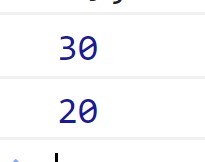
이렇게 만든다면 객체를 원하는 값에 따라 원하는 만큼 만들 수 있다.